
Table of Contents
- Overview
- Prerequisites
- Quick Architecture
- Install / Setup
- Base Configuration
- Reload/Enable & Health Checks
- Security / Hardening
- Performance & Optimization
- Backup & Restore
- Troubleshooting (Top issues)
- Key Takeaways & Next Steps
Overview
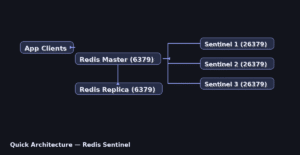
redis sentinel high availability setup active passive linux — production-ready Redis Sentinel with one master, one replica, and three Sentinels.
Most paths are identical across distros: /etc/redis/redis.conf, /etc/redis/sentinel.conf, and data in /var/lib/redis.
Where differences exist (install, service names, firewall, Sentinel unit on Arch), commands are shown per-OS; otherwise, steps are written once for all.
Prerequisites
- Two Linux nodes for Redis (master/replica) + three Sentinel instances (can co-locate).
- Open TCP 6379 (Redis) and 26379 (Sentinel). Time in sync.
- IPs/hostnames:
MASTER_IP,REPLICA_IP.
Quick Architecture
Install / Setup
Ubuntu/Debian
sudo apt update
sudo apt -y install redis-server
sudo systemctl enable --now redis-server
sudo systemctl enable --now redis-sentinel || true
RHEL-Family (RHEL/Rocky/CentOS Stream/Fedora)
sudo dnf -y install redis
sudo systemctl enable --now redis
sudo systemctl enable --now redis-sentinel || true
Arch / Manjaro
sudo pacman -Sy --noconfirm redis
sudo systemctl enable --now redis
# If the sentinel unit is missing, enable the contributed unit
sudo cp /usr/share/redis/contrib/systemd-redis-sentinel.service /etc/systemd/system/redis-sentinel.service 2>/dev/null || true
sudo systemctl enable --now redis-sentinel || true
openSUSE / SLE
sudo zypper refresh
sudo zypper -n install redis
sudo systemctl enable --now redis
sudo systemctl enable --now redis-sentinel || true
Base Configuration
Set core Redis and Sentinel options: ports, bind/protected-mode, authentication, and basic persistence. Commands below show exact file edits per distro where they differ.
Across distros the configuration file paths are the same. Only Ubuntu/Debian uses a different service name (redis-server). The following commands apply to all.
Master
The master serves writes and replication to downstream replicas. Restrict exposure of 6379/tcp, keep protected‑mode on or bind explicit interfaces, use a strong password, and choose persistence (RDB and/or AOF) to balance durability and latency.
sudo cp /etc/redis/redis.conf /etc/redis/redis.conf.bak
sudo sed -i 's/^#\?bind .*/bind 0.0.0.0/' /etc/redis/redis.conf
sudo sed -i 's/^#\?protected-mode .*/protected-mode yes/' /etc/redis/redis.conf
echo 'requirepass STRONGPASSWORD' | sudo tee -a /etc/redis/redis.conf
echo 'appendonly yes' | sudo tee -a /etc/redis/redis.conf
Replica
The replica continuously follows the master (replicaof) and is read‑only by default. Ensure authentication (masterauth) matches the master, size the repl‑backlog to ride out short outages, and verify persistence (AOF/RDB) so a restart does not lose state.
sudo cp /etc/redis/redis.conf /etc/redis/redis.conf.bak
sudo sed -i 's/^#\?bind .*/bind 0.0.0.0/' /etc/redis/redis.conf
sudo sed -i 's/^#\?protected-mode .*/protected-mode yes/' /etc/redis/redis.conf
echo 'masterauth STRONGPASSWORD' | sudo tee -a /etc/redis/redis.conf
echo 'replicaof MASTER_IP 6379' | sudo tee -a /etc/redis/redis.conf
echo 'appendonly yes' | sudo tee -a /etc/redis/redis.conf
Sentinels (3 nodes)
Sentinels monitor the master and replicas, form quorum, and trigger failover when the master is unreachable. Always deploy an odd number (3+) so a majority can vote. Keep port 26379/tcp reachable only between cluster nodes, set identical monitor/down-after/failover-timeout values, and authenticate to Redis if authentication is enabled.
sudo install -o redis -g redis -m 640 /dev/null /etc/redis/sentinel.conf 2>/dev/null || true
sudo bash -c 'cat >/etc/redis/sentinel.conf' << "EOF"
port 26379
sentinel monitor mymaster MASTER_IP 6379 2
sentinel auth-pass mymaster STRONGPASSWORD
sentinel down-after-milliseconds mymaster 5000
sentinel failover-timeout mymaster 60000
sentinel parallel-syncs mymaster 1
EOF
sudo chown redis:redis /etc/redis/sentinel.conf
Reload/Enable & Health Checks
Reload services safely, enable autostart, and verify health: processes, ports, role/replication state, and quorum. Use these commands after any change.
Reload/Enable
# Ubuntu/Debian
sudo systemctl restart redis-server && sudo systemctl restart redis-sentinel || true
sudo systemctl enable redis-server redis-sentinel || true

# Other distros (RHEL, Arch, openSUSE)
sudo systemctl restart redis && sudo systemctl restart redis-sentinel || true
sudo systemctl enable redis redis-sentinel || true
Health / Connectivity
After any change, verify processes, ports, and roles cluster‑wide. Check systemctl/journalctl for service health, ss -tulpen for sockets, and use redis‑cli PING, INFO replication, and SENTINEL ckquorum/sentinel master to confirm quorum and failover readiness.
# Master
redis-cli -a STRONGPASSWORD PING
# Replica role/link
redis-cli -a STRONGPASSWORD INFO replication | egrep 'role|master_host|master_link_status'
# Sentinel state
redis-cli -p 26379 SENTINEL master mymaster
redis-cli -p 26379 SENTINEL slaves mymaster
redis-cli -p 26379 SENTINEL sentinels mymaster
Firewall
Allow only what’s needed: 6379/tcp (Redis) between app hosts and Redis nodes, and 26379/tcp (Sentinel) among Redis nodes. Deny public access; permit only trusted subnets. Persist rules with UFW/Firewalld and ensure SELinux port contexts are aligned if enforcing.
# Ubuntu/Debian (UFW)
sudo ufw allow 6379/tcp
sudo ufw allow 26379/tcp
# firewalld (RHEL/Fedora/openSUSE)
sudo firewall-cmd --add-port=6379/tcp --permanent
sudo firewall-cmd --add-port=26379/tcp --permanent
sudo firewall-cmd --reload
Security / Hardening
Lock down access: minimal bind interfaces or firewall rules, strong AUTH, disable risky commands if needed, and enable basic TLS if your environment requires encryption.
# Limit to private subnets + set passwords if missing
sudo sed -i 's/^bind .*/bind 10.0.0.0\\/8 192.168.0.0\\/16 172.16.0.0\\/12/' /etc/redis/redis.conf
grep -E '^(requirepass|masterauth)' /etc/redis/redis.conf || echo 'requirepass STRONGPASSWORD' | sudo tee -a /etc/redis/redis.conf

# Rename dangerous commands
echo 'rename-command FLUSHALL ""' | sudo tee -a /etc/redis/redis.conf
echo 'rename-command FLUSHDB ""'  | sudo tee -a /etc/redis/redis.conf
echo 'rename-command CONFIG ""'   | sudo tee -a /etc/redis/redis.conf

# TLS quick test (optional)
sudo mkdir -p /etc/redis/ssl && cd /etc/redis/ssl
sudo openssl req -x509 -nodes -newkey rsa:4096 -keyout redis.key -out redis.crt -subj "/CN=redis"
sudo chmod 600 redis.key
sudo tee -a /etc/redis/redis.conf <<EOF
tls-port 6379
port 0
tls-cert-file /etc/redis/ssl/redis.crt
tls-key-file  /etc/redis/ssl/redis.key
EOF
Performance & Optimization
Tune persistence and networking for predictable latency: AOF/RDB choices, fsync strategy, TCP backlog/keepalive, overcommit, and recommended kernel limits.
# Kernel/network (all)
echo 'net.core.somaxconn = 1024' | sudo tee /etc/sysctl.d/99-redis.conf
echo 'vm.overcommit_memory = 1'  | sudo tee -a /etc/sysctl.d/99-redis.conf
sudo sysctl --system

# Redis (all)
sudo sed -i 's/^#\?appendfsync .*/appendfsync everysec/' /etc/redis/redis.conf
echo 'maxmemory 2gb'                 | sudo tee -a /etc/redis/redis.conf
echo 'maxmemory-policy allkeys-lru'  | sudo tee -a /etc/redis/redis.conf

# Restart (Ubuntu/Debian uses redis-server; others redis)
sudo systemctl restart redis-server || sudo systemctl restart redis
Backup & Restore
Perform consistent backups and test restores. Prefer service stops or `SAVE` for point-in-time, verify files with `redis-check-*`, and restore with correct ownership/paths.
# Backup (all distros share paths: /var/lib/redis)
redis-cli -a STRONGPASSWORD SAVE
sudo mkdir -p ~/backup
sudo cp /var/lib/redis/dump.rdb ~/backup/dump-$(date +%F).rdb 2>/dev/null || true
sudo cp /var/lib/redis/appendonly.aof ~/backup/appendonly-$(date +%F).aof 2>/dev/null || true
redis-check-rdb ~/backup/dump-*.rdb
redis-check-aof --fix ~/backup/appendonly-*.aof 2>/dev/null || true

# Restore (only service name differs)
# Ubuntu/Debian
sudo systemctl stop redis-server; sudo cp ~/backup/dump-YYYY-MM-DD.rdb /var/lib/redis/dump.rdb; sudo chown redis:redis /var/lib/redis/dump.rdb; sudo systemctl start redis-server
# Other distros
sudo systemctl stop redis;        sudo cp ~/backup/dump-YYYY-MM-DD.rdb /var/lib/redis/dump.rdb; sudo chown redis:redis /var/lib/redis/dump.rdb; sudo systemctl start redis
Troubleshooting (Top issues)
1) No quorum / failover — quick checks and fixes.
redis-cli -p 26379 SENTINEL ckquorum mymaster
redis-cli -p 26379 SENTINEL master mymaster | egrep 'ip|port|flags'
2) Replica not syncing — quick checks and fixes.
redis-cli -a STRONGPASSWORD INFO replication | egrep 'role|master_link_status|master_host'
grep -E 'masterauth|requirepass' /etc/redis/redis.conf
3) Connection refused / protected mode — quick checks and fixes.
grep -E '^bind|protected-mode' /etc/redis/redis.conf
ss -tulpn | egrep ':6379|:26379'
4) Sentinel service missing (Arch example) — quick checks and fixes.
systemctl status redis-sentinel || (sudo cp /usr/share/redis/contrib/systemd-redis-sentinel.service /etc/systemd/system/redis-sentinel.service && sudo systemctl enable --now redis-sentinel)Key Takeaways & Next Steps
- Per-OS only where there are differences; the rest is unified.
- Drill failover regularly and back up before changes.
- This redis sentinel high availability setup active passive linux provides a solid base for production.