
Table of Contents
- Overview
- Prerequisites
- Quick Architecture
- Install / Setup
- Base Configuration
- Reload/Enable & Health Checks
- Security / Hardening
- Performance & Optimization
- Backup & Restore
- Troubleshooting (Top issues)
- Key Takeaways & Next Steps
Overview
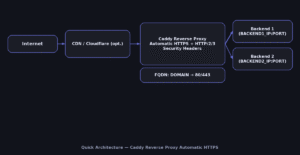
This guide walks you through a production-ready Caddy Reverse Proxy Automatic HTTPS on Linux.
You will terminate TLS at Caddy, enable HTTP/2/3, apply strict security headers and forward traffic
to one or more backend apps. Automatic certificate management keeps HTTPS working with minimal effort.
See the official docs for details on directives and options in Caddy
(caddyserver.com/docs).
Prerequisites
- Supported OS: Ubuntu/Debian | RHEL/Rocky/CentOS Stream/Fedora | Arch/Manjaro | openSUSE/SLE
- Open ports:
80/tcpand443/tcpto this server; DNS A/AAAA for your domain. - Packages:
curl, a text shell, andsudoaccess. - Placeholders (define once, then reuse):
DOMAIN,EMAIL,BACKEND1_IP,BACKEND2_IP,BACKEND_PORT.
Quick Architecture
Install / Setup
Install Caddy from your distro’s packages or the official repository. The result is a managed service named caddy.
Ubuntu/Debian — install Caddy
set -euo pipefail
sudo apt update
sudo apt -y install debian-keyring debian-archive-keyring apt-transport-https curl
curl -fsSL https://dl.cloudsmith.io/public/caddy/stable/gpg.key | sudo gpg --dearmor -o /usr/share/keyrings/caddy-stable-archive-keyring.gpg
echo "deb [signed-by=/usr/share/keyrings/caddy-stable-archive-keyring.gpg] https://dl.cloudsmith.io/public/caddy/stable/deb/ubuntu any-version main" | sudo tee /etc/apt/sources.list.d/caddy-stable.list
sudo apt update && sudo apt -y install caddy
caddy version
RHEL/Rocky/CentOS Stream/Fedora — install Caddy
set -euo pipefail
sudo dnf -y install 'dnf-command(copr)'
sudo dnf -y copr enable @caddy/caddy
sudo dnf -y install caddy
caddy version
Arch/Manjaro — install Caddy
set -euo pipefail
sudo pacman -Syu --noconfirm caddy
caddy version
openSUSE/SLE — install Caddy
set -euo pipefail
sudo zypper refresh
sudo zypper install -y caddy
caddy version
Base Configuration
Write a minimal but secure Caddyfile that enables the Caddy Reverse Proxy Automatic HTTPS with load balancing and health checks.
# Define your values once for reuse
export DOMAIN="example.com"
export EMAIL="[email protected]"
export BACKEND1_IP="10.0.0.11"
export BACKEND2_IP="10.0.0.12"
export BACKEND_PORT="8080"

# Create /etc/caddy/Caddyfile in one shot
sudo tee /etc/caddy/Caddyfile >/dev/null <<'CADDYFILE'
# Global options
{{
    email {{$EMAIL}}
    # Optional: increase default timeouts
    # servers :443 {{
    #     timeouts {{
    #         read_body   30s
    #         read_header 10s
    #         write       30s
    #         idle        2m
    #     }}
    # }}
}}

{{$DOMAIN}} {{
    encode zstd gzip
    tls {{$EMAIL}}
    header {{
        -Server
        X-Frame-Options "SAMEORIGIN"
        X-Content-Type-Options "nosniff"
        Referrer-Policy "strict-origin-when-cross-origin"
        Permissions-Policy "accelerometer=(),ambient-light-sensor=(),autoplay=(),camera=(),geolocation=(),gyroscope=(),magnetometer=(),microphone=(),payment=(),usb=()"
    }}

    @health path /_health
    respond @health 200

    reverse_proxy http://{{$BACKEND1_IP}}:{{$BACKEND_PORT}} http://{{$BACKEND2_IP}}:{{$BACKEND_PORT}} {{
        lb_policy round_robin
        lb_try_duration 10s
        health_uri /_health
        transport http {{
            versions h2c 1.1
            idle_conns_per_host 64
        }}
        header_up X-Forwarded-Proto "{{scheme}}"
        header_up X-Forwarded-Host  "{{host}}"
        header_up X-Real-IP         "{{remote}}"
    }}
}}
CADDYFILE

# Validate syntax
sudo caddy validate --config /etc/caddy/Caddyfile
Reload/Enable & Health Checks
# Enable + start
sudo systemctl enable --now caddy

# Watch logs (another shell)
sudo journalctl -u caddy -f

# Verify ports 80/443 are listening
ss -tulpen | grep -E ':80|:443'

# HTTP(S) checks (replace DOMAIN)
curl -I http://$DOMAIN
curl -I https://$DOMAIN

# If behind Cloudflare, set SSL mode to "Full (strict)"
Security / Hardening
Limit exposure and follow least-privilege. The Caddy Reverse Proxy Automatic HTTPS should be reachable only on 80/443.
UFW (Ubuntu/Debian)
sudo ufw allow 80/tcp
sudo ufw allow 443/tcp
sudo ufw reload
sudo ufw status
firewalld (RHEL/Rocky/Fedora/openSUSE)
sudo firewall-cmd --permanent --add-service=http
sudo firewall-cmd --permanent --add-service=https
sudo firewall-cmd --reload
sudo firewall-cmd --list-all
Systemd hardening (drop-in)
sudo install -d -m 0755 /etc/systemd/system/caddy.service.d
sudo tee /etc/systemd/system/caddy.service.d/override.conf >/dev/null <<'OVR'
[Service]
AmbientCapabilities=CAP_NET_BIND_SERVICE
CapabilityBoundingSet=CAP_NET_BIND_SERVICE
NoNewPrivileges=true
PrivateTmp=true
ProtectHostname=true
ProtectKernelLogs=true
ProtectSystem=full
ReadWritePaths=/var/lib/caddy /var/log/caddy /etc/caddy
OVR

sudo systemctl daemon-reload
sudo systemctl restart caddy
Performance & Optimization
Enable compression and keep connections hot. Caddy handles HTTP/2/3 automatically when supported.
# /etc/caddy/Caddyfile — snippet inside your site
encode zstd gzip

@static path /assets/* /static/* /_next/* /favicon.ico
header @static Cache-Control "public, max-age=2592000, immutable"
Backup & Restore
Back up configuration and ACME state so certificates and settings restore cleanly.
# (A) Backup
sudo tar -C / -czf /root/caddy-backup-$(date +%F).tgz   etc/caddy var/lib/caddy var/log/caddy --numeric-owner
sha256sum /root/caddy-backup-$(date +%F).tgz
# (B) Restore
set -euo pipefail
BACKUP="/root/caddy-backup-YYYY-MM-DD.tgz"
sudo systemctl stop caddy
sudo tar -C / -xzf "$BACKUP"
sudo chown -R caddy:caddy /etc/caddy /var/lib/caddy /var/log/caddy
sudo systemctl start caddy && sudo systemctl status --no-pager caddy
Troubleshooting (Top issues)
1) Certificates not issued (HTTP challenge fails)
Symptom: caddy logs show ACME challenge timeouts. Likely cause: port 80 blocked or DNS not pointing to this server.
ss -tulpen | grep ':80'
dig +short A $DOMAIN; dig +short AAAA $DOMAIN
sudo journalctl -u caddy --since "10 min ago"
2) 502 Bad Gateway from reverse proxy
Symptom: HTTP 502/504. Likely cause: backend not reachable or wrong BACKEND_PORT.
curl -sS http://$BACKEND1_IP:$BACKEND_PORT/_health
curl -sS http://$BACKEND2_IP:$BACKEND_PORT/_health
sudo journalctl -u caddy -n 200 --no-pager
3) Cloudflare in front of Caddy breaks redirects
Symptom: redirect loops. Likely cause: “Flexible” SSL at Cloudflare.
# Set Cloudflare SSL mode to "Full (strict)" for Caddy Reverse Proxy Automatic HTTPS
# Then purge cache and test again
4) Port conflicts with Nginx/Apache
Symptom: Caddy fails to bind 80/443. Likely cause: other web server already listening.
sudo ss -tulpen | grep -E ':80|:443'
sudo systemctl disable --now nginx apache2 httpd || true
sudo systemctl restart caddy
5) SELinux blocks outbound to backends (RHEL/Fedora)
Symptom: 502 errors and avc: denied in logs. Likely cause: SELinux policy.
# allow reverse proxy connections
sudo setsebool -P httpd_can_network_connect 1
sudo ausearch -m AVC,USER_AVC -ts recent | tail -n 50
Key Takeaways & Next Steps
- Caddy Reverse Proxy Automatic HTTPS simplifies HTTPS with automatic certificates and smart defaults.
- Harden access (firewall + systemd), watch logs, and validate changes with
caddy validate. - Next: add service-specific routes, rate limits, or JWT/OAuth in front of your apps.