
Table of Contents
- Overview
- Prerequisites
- Quick Architecture
- Install / Setup
- Base Configuration
- Reload/Enable & Health Checks
- Security / Hardening
- Performance & Optimization
- Backup & Restore
- Troubleshooting (Top issues)
- Key Takeaways & Next Steps
Overview
In this guide you will deploy a production-ready Traefik Reverse Proxy Lets Encrypt HTTP/3 on Linux.
Traefik will terminate TLS using Let’s Encrypt (ACME), negotiate HTTP/2/3 for modern browsers,
apply security headers, and forward traffic to one or more backends. You’ll create a static
configuration (/etc/traefik/traefik.yml) and a dynamic file provider
(/etc/traefik/dynamic/site.yml) that define routers, middlewares, and services.
Why Traefik? It’s lightweight, supports automatic certificates, hot-reload for configuration,
and first-class HTTP/3 support. For deeper reference see the official docs at
doc.traefik.io/traefik.
Prerequisites
- Linux distros: Ubuntu/Debian, RHEL/Rocky/CentOS Stream/Fedora, Arch/Manjaro, openSUSE/SLE.
- Networking: DNS A/AAAA for your domain must point to this server. Open
80/tcp(ACME challenge) and443/tcp(HTTPS). - Variables you’ll reuse:
DOMAIN,EMAIL,BACKEND1_IP,BACKEND2_IP,BACKEND_PORT.
Quick Architecture
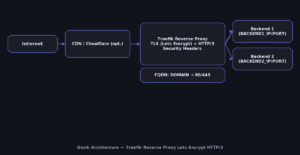
Install / Setup
Install Traefik from your distribution repositories. The service runs as traefik and listens on ports 80/443
that we’ll define in the static config. After installation, confirm the version to ensure the binary is available.
Ubuntu/Debian
sudo apt update
sudo apt -y install traefik
traefik version
RHEL/Rocky/CentOS Stream/Fedora
sudo dnf -y install traefik
traefik version
Arch/Manjaro
sudo pacman -Syu --noconfirm traefik
traefik version
openSUSE/SLE
sudo zypper refresh
sudo zypper install -y traefik
traefik version
Base Configuration
You’ll create two files:
/etc/traefik/traefik.yml— the static configuration that defines entrypoints (ports), log levels,
the ACME (Let’s Encrypt) resolver, and enables the file provider./etc/traefik/dynamic/site.yml— the dynamic configuration with a security‑headers middleware,
a router that matchesHost($DOMAIN)and terminates TLS, and a load‑balanced service pointing to your backends.
HTTP/3 is enabled on the websecure entrypoint. ACME stores certificates in /var/lib/traefik/acme.json (permission 600).
# Variables
export DOMAIN="example.com"
export EMAIL="[email protected]"
export BACKEND1_IP="10.0.0.21"
export BACKEND2_IP="10.0.0.22"
export BACKEND_PORT="8080"

# Create directories
sudo install -d -m 0755 /etc/traefik /etc/traefik/dynamic /var/lib/traefik

# Static configuration (/etc/traefik/traefik.yml)
sudo tee /etc/traefik/traefik.yml >/dev/null <<'YAML'
entryPoints:
  web:
    address: ":80"
  websecure:
    address: ":443"
    http:
      tls: {{}}
    http3: true

api:
  dashboard: true

log:
  level: INFO

accessLog: {{}}

certificatesResolvers:
  letsencrypt:
    acme:
      email: ${{EMAIL}}
      storage: /var/lib/traefik/acme.json
      httpChallenge:
        entryPoint: web

providers:
  file:
    directory: /etc/traefik/dynamic
    watch: true
YAML

# Dynamic config (/etc/traefik/dynamic/site.yml)
sudo tee /etc/traefik/dynamic/site.yml >/dev/null <<'YAML'
http:
  middlewares:
    sec-headers:
      headers:
        frameDeny: true
        contentTypeNosniff: true
        referrerPolicy: "strict-origin-when-cross-origin"
        permissionsPolicy: "camera=(),geolocation=(),microphone=()"

  routers:
    site:
      rule: "Host(`${{DOMAIN}}`)"
      entryPoints: ["websecure"]
      service: app
      tls:
        certResolver: letsencrypt
      middlewares: ["sec-headers"]

  services:
    app:
      loadBalancer:
        passHostHeader: true
        healthCheck:
          path: "/_health"
          interval: "10s"
        servers:
          - url: "http://${{BACKEND1_IP}}:${{BACKEND_PORT}}"
          - url: "http://${{BACKEND2_IP}}:${{BACKEND_PORT}}"
YAML

sudo touch /var/lib/traefik/acme.json
sudo chmod 600 /var/lib/traefik/acme.json
sudo systemctl enable --now traefik
Reload/Enable & Health Checks
Reload picks up changes; restart if reload fails due to syntax errors. Verify ports and test HTTP then HTTPS.
sudo systemctl reload traefik || sudo systemctl restart traefik
sudo journalctl -u traefik -f
ss -tulpen | grep -E ':80|:443'
curl -I http://$DOMAIN
curl -I https://$DOMAIN
Security / Hardening
Expose only required ports using the tool that matches your OS:
- UFW — Ubuntu/Debian
- firewalld — RHEL/Rocky/CentOS Stream/Fedora/openSUSE/SLE
# UFW (Ubuntu/Debian)
sudo ufw allow 80/tcp
sudo ufw allow 443/tcp
sudo ufw reload
sudo ufw status

# firewalld (RHEL/Rocky/Fedora/openSUSE/SLE)
sudo firewall-cmd --permanent --add-service=http
sudo firewall-cmd --permanent --add-service=https
sudo firewall-cmd --reload
sudo firewall-cmd --list-all
Systemd hardening reduces attack surface by limiting capabilities and file access.
sudo install -d -m 0755 /etc/systemd/system/traefik.service.d
sudo tee /etc/systemd/system/traefik.service.d/override.conf >/dev/null <<'OVR'
[Service]
AmbientCapabilities=CAP_NET_BIND_SERVICE
CapabilityBoundingSet=CAP_NET_BIND_SERVICE
NoNewPrivileges=true
PrivateTmp=true
ProtectHostname=true
ProtectKernelLogs=true
ProtectSystem=full
ReadWritePaths=/etc/traefik /var/lib/traefik /var/log
OVR

sudo systemctl daemon-reload
sudo systemctl restart traefik
SELinux (RHEL/Fedora): if backends are blocked, allow web daemons to connect out:
setsebool -P httpd_can_network_connect 1.
Performance & Optimization
Use these practical tweaks:
- HTTP/3/QUIC: already enabled; browsers upgrade automatically. No extra client changes required.
- Static asset caching: add a middleware to return a long‑lived
Cache-Controlheader for assets; attach it to the router. - Compression: prefer enabling gzip/zstd in the backend app; Traefik forwards compressed responses as‑is.
- Logging overhead: keep
log.levelatINFOin production; reduceaccessLogretention if storage is tight.
# /etc/traefik/dynamic/site.yml — add and attach:
http:
  middlewares:
    static-cache:
      headers:
        customResponseHeaders:
          Cache-Control: "public, max-age=2592000, immutable"

  routers:
    site:
      middlewares:
        - sec-headers
        - static-cache
Backup & Restore
Back up static/dynamic configs and ACME state. On restore, stop Traefik, extract files, fix permissions on acme.json, then restart the service.
Backup (create archive + checksum)
sudo tar -C / -czf /root/traefik-backup-$(date +%F).tgz   etc/traefik var/lib/traefik --numeric-owner
sha256sum /root/traefik-backup-$(date +%F).tgz
Restore (stop service, extract, fix perms, start)
BACKUP="/root/traefik-backup-YYYY-MM-DD.tgz"
sudo systemctl stop traefik
sudo tar -C / -xzf "$BACKUP"
sudo chown -R root:root /etc/traefik
sudo chmod 600 /var/lib/traefik/acme.json || true
sudo systemctl start traefik && sudo systemctl status --no-pager traefik
Troubleshooting (Top issues)
No certificates issued — Port 80 blocked or DNS mismatch.
ss -tulpen | grep ':80'
dig +short A $DOMAIN; dig +short AAAA $DOMAIN
sudo journalctl -u traefik --since "10 min ago"
502/504 errors — Backends unhealthy or wrong port/path.
curl -sS http://$BACKEND1_IP:$BACKEND_PORT/_health
curl -sS http://$BACKEND2_IP:$BACKEND_PORT/_health
Port conflict — Another web server already listening.
sudo ss -tulpen | grep -E ':80|:443'
sudo systemctl disable --now nginx apache2 httpd || true
sudo systemctl restart traefik
Key Takeaways & Next Steps
- Traefik Reverse Proxy Lets Encrypt HTTP/3 provides automatic HTTPS and modern transport with minimal config.
- Harden with firewall + systemd; consider SELinux on RHEL/Fedora.
- Add rate limiting, OAuth/JWT, per‑route middlewares, and central logging next.