Table of Contents
- Overview
- Prerequisites
- Quick Architecture
- Plan Hosts & IPs
- Install / Setup
- Base Configuration (Patroni + etcd + HAProxy)
- Initialize Cluster & Replication
- Reload/Enable & Health Checks
- Security / Hardening
- Performance & Optimization
- Backup & Restore
- Troubleshooting (Top issues)
- Key Takeaways & Next Steps
- More reading (external)
Overview
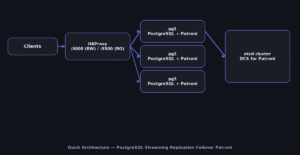
This guide builds a production-ready PostgreSQL Streaming Replication Failover Patroni on Linux using three nodes (pg1, pg2, pg3) and a lightweight
HAProxy for routing clients to the primary. Patroni
manages PostgreSQL and uses etcd as the distributed configuration store (DCS).
When the primary fails, Patroni promotes a replica automatically. Clients connect through HAProxy and keep working.
You’ll provision packages, configure Patroni/etcd/HAProxy via files, initialize streaming replication, test failover,
and set up safe backups. Wherever OS commands differ, each OS has its own separate code block so you can copy safely.
Prerequisites
- 3 Linux VMs or hosts (2 vCPU, 4–8 GB RAM, SSD recommended). Hostnames:
pg1,pg2,pg3. - 1 Load balancer host (can be one of the nodes) for HAProxy VIP/service.
- Open ports: PostgreSQL
5432/tcp, Patroni REST API8008/tcp, etcd peer/client2379-2380/tcp, HAProxy5000/tcp(example). - DNS or
/etc/hostsentries for the nodes and the HAProxy endpoint. - Same OS family across nodes (recommended). Time sync enabled.
Quick Architecture
Plan Hosts & IPs
Define the cluster in environment variables for repeatable commands:
export CLUSTER="pg-ha"
export PG_PRIMARY="pg1"    # will be elected during init
export NODES="pg1 pg2 pg3"
export DCS="etcd"
export HAPROXY_HOST="pg-lb"
export VIP_PORT="5000"     # client port on HAProxy
Install / Setup
We install PostgreSQL, Patroni (Python), etcd (as DCS), and HAProxy. Use the OS-specific blocks below.
Ubuntu/Debian
sudo apt update
sudo apt -y install postgresql-15 python3-pip python3-psycopg2 etcd haproxy
sudo pip3 install --upgrade patroni[etcd]
# enable services (etcd/haproxy start disabled until configured)
sudo systemctl disable --now etcd || true
sudo systemctl disable --now haproxy || true
RHEL/Rocky/CentOS Stream/Fedora
# Add PGDG repo for latest PostgreSQL (example: v15)
sudo dnf -y install https://download.postgresql.org/pub/repos/yum/reporpms/EL-$(rpm -E %rhel)-x86_64/pgdg-redhat-repo-latest.noarch.rpm
sudo dnf -y module disable postgresql
sudo dnf -y install postgresql15-server python3-pip python3-psycopg2 etcd haproxy
sudo pip3 install --upgrade patroni[etcd]
sudo systemctl disable --now etcd || true
sudo systemctl disable --now haproxy || true
Base Configuration (Patroni + etcd + HAProxy)
We’ll store configs under /etc/{patroni,etcd,haproxy}. Patroni runs PostgreSQL for each node and exposes a REST API at :8008.
etcd keeps the cluster state, and HAProxy forwards client traffic to the current primary (read/write) and replicas (read-only).
etcd config (all nodes)
Edit per node (name/IPs). Start after creating the file.
# /etc/etcd/etcd.conf (example for pg1)
ETCD_NAME="pg1"
ETCD_DATA_DIR="/var/lib/etcd"
ETCD_LISTEN_PEER_URLS="http://0.0.0.0:2380"
ETCD_LISTEN_CLIENT_URLS="http://0.0.0.0:2379"
ETCD_INITIAL_ADVERTISE_PEER_URLS="http://pg1:2380"
ETCD_ADVERTISE_CLIENT_URLS="http://pg1:2379"
ETCD_INITIAL_CLUSTER="pg1=http://pg1:2380,pg2=http://pg2:2380,pg3=http://pg3:2380"
ETCD_INITIAL_CLUSTER_STATE="new"
ETCD_INITIAL_CLUSTER_TOKEN="pg-ha-token"
Patroni config (per node)
Change name and connection strings for each node. Patroni creates PostgreSQL data dir automatically.
# /etc/patroni/patroni.yml (example for pg1)
scope: pg-ha
namespace: /service/
name: pg1

restapi:
  listen: 0.0.0.0:8008
  connect_address: pg1:8008

etcd:
  hosts: pg1:2379,pg2:2379,pg3:2379

bootstrap:
  dcs:
    ttl: 30
    loop_wait: 10
    retry_timeout: 10
    maximum_lag_on_failover: 1048576
    postgresql:
      parameters:
        wal_level: replica
        max_wal_senders: 10
        max_replication_slots: 10
        wal_keep_size: 512MB
        hot_standby: "on"
  initdb:
  - encoding: UTF8
  - data-checksums
  users:
    replication:
      password: replpass
      options:
      - replication
    admin:
      password: adminpass
      options:
      - createrole
      - createdb

postgresql:
  listen: 0.0.0.0:5432
  connect_address: pg1:5432
  data_dir: /var/lib/postgresql/data
  pg_hba:
  - host all all 0.0.0.0/0 md5
  - host replication replication 0.0.0.0/0 md5
  parameters:
    shared_buffers: "1GB"
    work_mem: "64MB"
    maintenance_work_mem: "256MB"
    effective_cache_size: "3GB"
tags:
  clonefrom: true
HAProxy config (load balancer host)
Routes write traffic to primary and provides a read-only port for replicas.
# /etc/haproxy/haproxy.cfg
global
  daemon
  maxconn 4096

defaults
  mode tcp
  timeout connect 10s
  timeout client  1m
  timeout server  1m

frontend psql_rw
  bind *:5000
  default_backend patroni_rw

backend patroni_rw
  option httpchk GET /master
  http-check expect status 200
  server pg1 pg1:5432 check port 8008
  server pg2 pg2:5432 check port 8008
  server pg3 pg3:5432 check port 8008

frontend psql_ro
  bind *:5500
  default_backend patroni_ro

backend patroni_ro
  balance roundrobin
  option httpchk GET /replica
  http-check expect status 200
  server pg1 pg1:5432 check port 8008
  server pg2 pg2:5432 check port 8008
  server pg3 pg3:5432 check port 8008
Initialize Cluster & Replication
Start etcd on all nodes, then start Patroni on each node — the first to initialize becomes primary.
Ubuntu/Debian
sudo systemctl enable --now etcd
sudo systemctl enable --now patroni || sudo systemctl start patroni
sudo systemctl enable --now haproxy
RHEL/Rocky/CentOS Stream/Fedora
sudo systemctl enable --now etcd
sudo systemctl enable --now patroni || sudo systemctl start patroni
sudo systemctl enable --now haproxy
Reload/Enable & Health Checks
Use this sequence after changing configs.
- Validate configs (YAML syntax) then restart affected services.
- Check cluster state with Patroni REST and PostgreSQL roles.
- Test failover by stopping primary and watching promotion.
Validate & Apply
# YAML sanity (example)
python3 -c "import yaml,sys; yaml.safe_load(open('/etc/patroni/patroni.yml'))" 2>/dev/null && echo OK || echo FAIL

# Restart components after edits
sudo systemctl restart etcd
sudo systemctl restart patroni
sudo systemctl restart haproxy
Health checks
# Patroni REST
curl -s pg1:8008/health | jq .
curl -s pg2:8008/health | jq .

# Who is primary?
curl -s pg1:8008/master || curl -s pg2:8008/master || curl -s pg3:8008/master

# SQL check via HAProxy (requires psql client)
psql "host=pg-lb port=5000 user=admin password=adminpass dbname=postgres" -c 'select pg_is_in_recovery();'
Security / Hardening
Open only required ports and restrict access to HAProxy and PostgreSQL. Use the firewall that matches your OS.
Ubuntu/Debian (UFW)
sudo ufw allow OpenSSH
sudo ufw allow 2379,2380/tcp   # etcd
sudo ufw allow 5432/tcp        # PostgreSQL
sudo ufw allow 5000/tcp        # HAProxy RW
sudo ufw allow 5500/tcp        # HAProxy RO
sudo ufw allow 8008/tcp        # Patroni REST
sudo ufw reload
sudo ufw status
RHEL/Rocky/CentOS/Fedora/openSUSE/SLE (firewalld)
sudo firewall-cmd --permanent --add-port=2379-2380/tcp
sudo firewall-cmd --permanent --add-port=5432/tcp
sudo firewall-cmd --permanent --add-port=5000/tcp
sudo firewall-cmd --permanent --add-port=5500/tcp
sudo firewall-cmd --permanent --add-port=8008/tcp
sudo firewall-cmd --reload
sudo firewall-cmd --list-ports
pg_hba.conf tightening: replace 0.0.0.0/0 with trusted subnets; use SSL/TLS for client traffic (set up certs in PostgreSQL and HAProxy).
Performance & Optimization
Start with realistic memory settings and WAL tuning; use read-only replicas for heavy analytics.
- Memory: adjust
shared_buffers(~25% RAM),effective_cache_size(~50–75% RAM). - WAL: raise
max_wal_sizeand keepwal_keep_sizeto survive network hiccups. - Checkpoints: set
max_wal_sizeandcheckpoint_timeoutfor your workload. - Read scaling: route analytics to
:5500(replicas) via HAProxy.
Backup & Restore
Use pg_basebackup for base images and pg_dump for logical backups. Separate blocks for Backup vs Restore.
Backup (physical + logical)
# Physical base backup from primary
PGHOST=pg-lb PGPORT=5000 PGPASSWORD=adminpass pg_basebackup -U replication -D /backup/pg-$(date +%F) -Fp -Xs -P

# Logical dump of a database
PGPASSWORD=adminpass pg_dump -h pg-lb -p 5000 -U admin -F c -d postgres -f /backup/postgres-$(date +%F).dump
Restore
# Restore physical (example)
sudo systemctl stop patroni
rm -rf /var/lib/postgresql/data/*
tar -C /var/lib/postgresql/data -xzf /path/to/pg-YYYY-MM-DD.tar.gz
sudo systemctl start patroni

# Restore logical
PGPASSWORD=adminpass pg_restore -h pg-lb -p 5000 -U admin -d postgres /backup/postgres-YYYY-MM-DD.dump
Troubleshooting (Top issues)
Replication not starting — check pg_hba.conf replication lines and replication user creds.
sudo journalctl -u patroni -n 200 --no-pager
psql -h pg-lb -p 5000 -U admin -c "select client_addr,state,sync_state from pg_stat_replication;"
Failover loop — network split or low TTL. Ensure nodes see each other and raise ttl.
etcdctl --endpoints=pg1:2379,pg2:2379,pg3:2379 endpoint health
curl -s pg1:8008/config | jq .dcs.ttl
HAProxy not routing — health checks failing on Patroni REST.
curl -s pg1:8008/master
curl -s pg1:8008/replica
Key Takeaways & Next Steps
- PostgreSQL Streaming Replication Failover Patroni delivers automatic failover and simple read scaling.
- Harden network access, use TLS, and tune memory/WAL for workload.
- Next: add synchronous replication for zero data loss, and automate backups to object storage.