Table of Contents
- Overview
- Prerequisites
- Quick Architecture
- Variables
- Step 1 — Install / Setup
- Step 2 — Base Configuration
- Step 3 — Enable & Health Checks
- Advanced Add-Ons
- Troubleshooting (Top issues)
- Key Takeaways & Next Steps
Overview
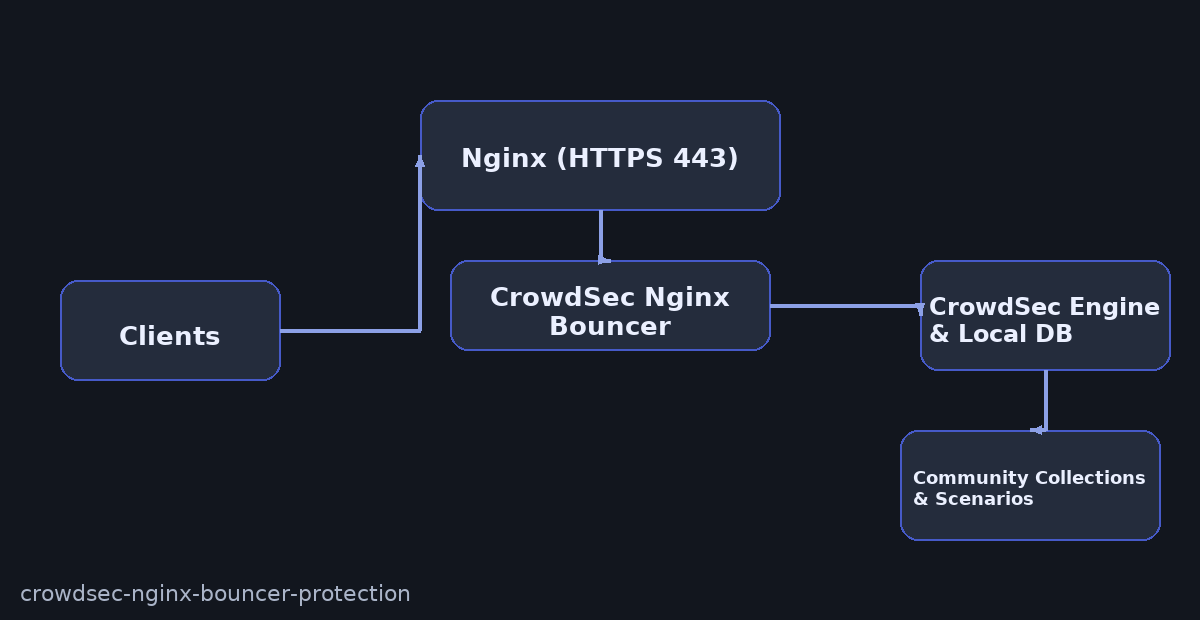
Harden your HTTPS site with CrowdSec Nginx Bouncer Protection. CrowdSec parses logs, detects abusive patterns, and issues temporary decisions. The Nginx bouncer enforces those decisions at the reverse proxy (403 or captcha as configured).
Prerequisites
Nginx already serving your site over HTTPS (443), sudo shell access, and outbound internet to sync the CrowdSec hub.
Quick Architecture
Variables
Before you copy: Edit these once. After source /root/vars.sh, all later commands use them.
DOMAIN– your site’s FQDNEMAIL– mailboxNGINX_SITE– path to your Nginx siteCROWDSEC_BOUNCER_KEY– API key for the bouncer
All Linux
sudo install -d -m 700 /root
cat <<'EOF' | sudo tee /root/vars.sh
export DOMAIN="site.example.com"
export EMAIL="[email protected]"
export NGINX_SITE="/etc/nginx/sites-available/site.conf"
export CROWDSEC_BOUNCER_KEY=""
EOF
source /root/vars.sh
echo "$DOMAIN $NGINX_SITE"  # Check
Step 1 — Install / Setup
Debian / Ubuntu
curl -s https://packagecloud.io/install/repositories/crowdsec/crowdsec/script.deb.sh | sudo bash
sudo apt -y install crowdsec crowdsec-firewall-bouncer-iptables crowdsec-nginx-bouncer
sudo systemctl enable --now crowdsec
cscli version  # Check
RHEL / Rocky / Alma / CentOS Stream / Fedora
curl -s https://packagecloud.io/install/repositories/crowdsec/crowdsec/script.rpm.sh | sudo bash
sudo dnf -y install crowdsec crowdsec-firewall-bouncer-iptables crowdsec-nginx-bouncer
sudo systemctl enable --now crowdsec
cscli version  # Check
Arch / Manjaro
sudo pacman -Syu --noconfirm crowdsec crowdsec-firewall-bouncer crowdsec-nginx-bouncer
sudo systemctl enable --now crowdsec
cscli version  # Check
openSUSE / SLE
sudo zypper refresh
sudo zypper in -y crowdsec crowdsec-firewall-bouncer crowdsec-nginx-bouncer
sudo systemctl enable --now crowdsec
cscli version  # Check
Step 2 — Base Configuration
All Linux — enroll Nginx collection
sudo cscli collections install crowdsecurity/nginx
sudo cscli parsers list | grep -i nginx  # Check
All Linux — create bouncer key & configure
CROWDSEC_BOUNCER_KEY=$(sudo cscli bouncers add nginx-bouncer -o raw)
echo "export CROWDSEC_BOUNCER_KEY='$CROWDSEC_BOUNCER_KEY'" | sudo tee -a /root/vars.sh
source /root/vars.sh
sudo sed -i 's/^api_key.*/api_key = "'$CROWDSEC_BOUNCER_KEY'"/' /etc/crowdsec/bouncers/crowdsec-nginx-bouncer.conf
sudo systemctl restart crowdsec-nginx-bouncer
sudo systemctl status --no-pager crowdsec-nginx-bouncer | head -n 10  # Check
All Linux — minimal Nginx integration
location / {
  set $crowdsec_decision "";
  auth_request /crowdsec-auth;
  if ($crowdsec_decision = "ban") { return 403; }
  proxy_pass http://127.0.0.1:8080;
}
location = /crowdsec-auth {
  internal;
  proxy_pass http://127.0.0.1:30100/v1/decision;
  proxy_set_header X-Forwarded-For $remote_addr;
  proxy_set_header X-Original-URI $request_uri;
}
Step 3 — Enable & Health Checks
sudo systemctl enable --now crowdsec-nginx-bouncer
sudo systemctl status --no-pager crowdsec | head -n 10
sudo tail -n 50 /var/log/crowdsec.log | sed -n '1,120p'
Advanced Add-Ons
Docker Compose (Engine-only Skeleton)
OS-agnostic: This runs the CrowdSec engine in Docker. Keep Nginx either on the host or as another container; point the Nginx bouncer to the engine API (127.0.0.1:8080 or the Compose service name).
version: "3.9"
services:
  crowdsec:
    image: crowdsecurity/crowdsec:latest
    container_name: crowdsec
    restart: unless-stopped
    # Mount your logs read-only so CrowdSec can parse them
    volumes:
      - /var/log/nginx:/var/log/nginx:ro
      - /etc/crowdsec:/etc/crowdsec
    # Expose local API for bouncers
    ports:
      - "8080:8080"
    environment:
      - COLLECTIONS=crowdsecurity/nginx
volumes:
  # Optional named volume(s) can be defined here for persistence if you store DB/config in containers
Nginx bouncer: configure it to query http://127.0.0.1:8080/ (host mode) or http://crowdsec:8080/ (within the same Compose network).
OS-agnostic only.
Community Scenarios
sudo cscli collections install crowdsecurity/http-cve
sudo cscli scenarios install crowdsecurity/http-probing
sudo cscli hub update && sudo cscli hub upgrade
sudo cscli hub list | grep -E "installed|enabled"
Decision TTL & Ban Modes
sudo sed -i 's/decision_max_duration:.*/decision_max_duration: 24h/' /etc/crowdsec/config.yaml
sudo systemctl restart crowdsec
Safe Lists
echo -e "192.168.0.0/16
10.0.0.0/8
127.0.0.1/8" | sudo tee /etc/crowdsec/acquis_whitelist.txt
sudo systemctl restart crowdsec
Troubleshooting (Top issues)
No decisions enforced
sudo cscli bouncers list
sudo systemctl status --no-pager crowdsec-nginx-bouncer | sed -n '1,120p'
Nginx errors on auth_request
sudo nginx -t && sudo systemctl reload nginx
sudo tail -n 100 /var/log/nginx/error.log
Parsing fails
sudo cscli metrics
sudo tail -n 100 /var/log/crowdsec.log
Key Takeaways & Next Steps
- CrowdSec Nginx Bouncer Protection at Nginx layer for fast blocking.
- Keep hub content updated and maintain safe lists.
- Tune ban TTLs to your traffic profile.