Table of Contents
- Overview – HAProxy Keepalived VRRP
- Prerequisites
- Quick Architecture
- Install / Setup
- Base Configuration
- Reload/Enable & Health Checks
- Security / Hardening
- Performance & Optimization
- Backup & Restore
- Troubleshooting (Top issues)
- Key Takeaways & Next Steps
Overview
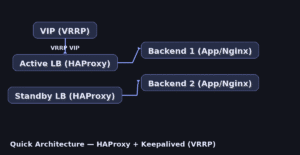
This guide builds a highly available load balancer using HAProxy for traffic proxying and Keepalived for VRRP failover. With two nodes sharing a virtual IP (VIP), traffic continues even if the active node fails. Includes per-distro installation steps and unified configs you can copy-paste.
Prerequisites
- Two Linux servers with sudo: LB1 and LB2.
- A real subnet and a free Virtual IP (VIP), e.g., 192.0.2.100/24.
- Open ports: TCP 80/443 (or your app ports); VRRP protocol 112 allowed between LBs.
- Placeholders: VIP, VIP_IF (e.g., eth0), ROUTER_ID, BACKEND1_IP, BACKEND2_IP, DOMAIN.
- Distros covered: Ubuntu/Debian, RHEL-family (RHEL/Rocky/CentOS Stream/Fedora), Arch/Manjaro, openSUSE/SLE.
Quick Architecture</h2
Install / Setup
1) Install HAProxy and Keepalived on both LB1 and LB2.
Ubuntu/Debian
sudo apt update && sudo apt install -y haproxy keepalivedRHEL-Family (RHEL/Rocky/CentOS Stream/Fedora)
sudo dnf -y install haproxy keepalivedArch / Manjaro
sudo pacman -Sy --noconfirm haproxy keepalivedopenSUSE / SLE
sudo zypper refresh && sudo zypper install -y haproxy keepalived2) Enable IP forwarding and non-local bind (required for VIP takeover).
sudo tee /etc/sysctl.d/99-ha-lb.conf > /dev/null <<'SYSCTL'
net.ipv4.ip_forward=1
net.ipv4.ip_nonlocal_bind=1
SYSCTL
sudo sysctl --system
3) (Optional) Spin up two simple backends (Nginx) for demo.
# On BACKEND1 and BACKEND2 (example backends)
sudo apt update && sudo apt install -y nginx 2>/dev/null || sudo dnf -y install nginx 2>/dev/null || sudo zypper -n install nginx 2>/dev/null || sudo pacman -Sy --noconfirm nginx 2>/dev/null
echo "Hello from $(hostname)" | sudo tee /usr/share/nginx/html/index.html
sudo systemctl enable --now nginx
Base Configuration
4) Configure HAProxy (same file on LB1 and LB2). Paste this full file in one go.
# /etc/haproxy/haproxy.cfg
sudo tee /etc/haproxy/haproxy.cfg > /dev/null <<'HAP'
global
  log /dev/log local0
  log /dev/log local1 notice
  maxconn 4096
  daemon

defaults
  log     global
  mode    http
  option  httplog
  option  dontlognull
  timeout connect 5s
  timeout client  50s
  timeout server  50s

frontend fe_http
  bind *:80
  bind *:443 ssl crt /etc/ssl/private/DOMAIN.pem alpn h2,http/1.1
  default_backend be_app

backend be_app
  balance roundrobin
  option httpchk GET /
  server app1 BACKEND1_IP:80 check
  server app2 BACKEND2_IP:80 check

listen stats
  bind *:8404
  stats enable
  stats uri /
  stats refresh 5s
HAP
5) Provide a TLS certificate if you terminate HTTPS on HAProxy (optional).
# Place PEM at /etc/ssl/private/DOMAIN.pem (key + cert chain concatenated)6) Configure Keepalived with VRRP on both nodes. LB1 is MASTER (higher priority) and LB2 is BACKUP.
# /etc/keepalived/keepalived.conf (LB1 - MASTER)
sudo tee /etc/keepalived/keepalived.conf > /dev/null <<'KVA'
vrrp_instance VI_1 {
  state MASTER
  interface VIP_IF
  virtual_router_id ROUTER_ID
  priority 101
  advert_int 1
  authentication {
    auth_type PASS
    auth_pass StrongVRRPpass
  }
  virtual_ipaddress {
    VIP/24
  }
  track_script {
    chk_haproxy
  }
}

vrrp_script chk_haproxy {
  script "/usr/bin/pgrep -f 'haproxy.*-Ws' || /usr/bin/pgrep haproxy"
  interval 2
  weight -20
}
KVA
# /etc/keepalived/keepalived.conf (LB2 - BACKUP)
sudo tee /etc/keepalived/keepalived.conf > /dev/null <<'KVB'
vrrp_instance VI_1 {
state BACKUP
interface VIP_IF
virtual_router_id ROUTER_ID
priority 100
advert_int 1
authentication {
auth_type PASS
auth_pass StrongVRRPpass
}
virtual_ipaddress {
VIP/24
}
track_script {
chk_haproxy
}
}
vrrp_script chk_haproxy {
script "/usr/bin/pgrep -f 'haproxy.*-Ws' || /usr/bin/pgrep haproxy"
interval 2
weight -20
}
KVBReload/Enable & Health Checks
7) Enable and start services on both nodes.
sudo systemctl enable --now haproxy
sudo systemctl enable --now keepalived
8) Validate VIP assignment and failover.
ip addr show dev VIP_IF | sed -n '1,120p' | grep -E "inet .*VIP" || echo "VIP not on this node"
sudo ss -lntp | grep -E ':(80|443|8404)'
curl -s http://VIP | head -n 2
# Simulate failover:
# sudo systemctl stop haproxy
# Then verify VIP moves to LB2.
Security / Hardening
# Allow only required ports (adjust firewall for your distro)
sudo ufw allow 80/tcp 2>/dev/null || true
sudo ufw allow 443/tcp 2>/dev/null || true
sudo ufw allow 8404/tcp 2>/dev/null || true
# VRRP uses protocol 112 (multicast 224.0.0.18) between LBs — allow it on your firewall
sudo ufw enable 2>/dev/null || true

# Systemd hardening for HAProxy (drop-in)
sudo mkdir -p /etc/systemd/system/haproxy.service.d
sudo tee /etc/systemd/system/haproxy.service.d/override.conf > /dev/null <<'OVR'
[Service]
NoNewPrivileges=true
PrivateTmp=true
ProtectHome=true
ProtectSystem=full
CapabilityBoundingSet=CAP_NET_BIND_SERVICE
OVR

sudo systemctl daemon-reload && sudo systemctl restart haproxy
Performance & Optimization
- Set proper health checks (httpchk) and timeouts matching your app latency.
- Prefer HTTP/2 on TLS frontends (ALPN h2) if your clients support it.
- Tune maxconn and observe with the HAProxy stats page (:8404).
- Use DNS resolvers for dynamic backends or cloud load balancers.
# DNS resolvers for dynamic backends (append to haproxy.cfg)
sudo tee -a /etc/haproxy/haproxy.cfg > /dev/null <<'HAP2'
resolvers dns
  nameserver google 8.8.8.8:53
  hold valid 10s

backend be_app
  balance roundrobin
  option httpchk GET /healthz
  default-server init-addr last,libc,none resolvers dns check inter 2s fall 3 rise 2
HAP2
sudo systemctl reload haproxy
Backup & Restore
sudo tar czf ha-lb-backup-$(date +%F).tgz /etc/haproxy /etc/keepalived /etc/sysctl.d/99-ha-lb.conf
# Restore:
# sudo tar xzf ha-lb-backup-YYYY-MM-DD.tgz -C /
# sudo sysctl --system
# sudo systemctl restart haproxy keepalived
Troubleshooting (Top issues)
1) VIP never appears — kernel settings or interface name wrong.
sysctl net.ipv4.ip_nonlocal_bind; sysctl net.ipv4.ip_forward; ip link show2) Failover slow — check VRRP adverts and priorities.
grep -n 'advert_int\|priority' /etc/keepalived/keepalived.conf3) Backends always down — health check path wrong or firewall blocking 80.
sudo ss -lntp | grep :80 || true; curl -I http://BACKEND1_IP/ || true4) TLS errors — missing PEM chain or wrong file path.
sudo ls -l /etc/ssl/private/; openssl x509 -noout -text -in /etc/ssl/private/DOMAIN.pem | head -n 20Key Takeaways & Next Steps
- Keepalived provides fast VRRP failover; HAProxy handles L7/L4 proxying.
- Harden services and restrict admin endpoints; monitor with stats.
- Next: add Prometheus exporters and alerts for LB health.