Table of Contents
- Overview
- Prerequisites
- Quick Architecture
- IP Plan & Variables
- Install / Setup
- Base Configuration (WireGuard + FRR/BGP)
- Routing Policy & Advertisements
- Reload/Enable & Health Checks
- Security / Hardening
- Performance & Optimization
- Backup & Restore
- Troubleshooting (Top issues)
- Key Takeaways & Next Steps
- More reading (external)
Overview
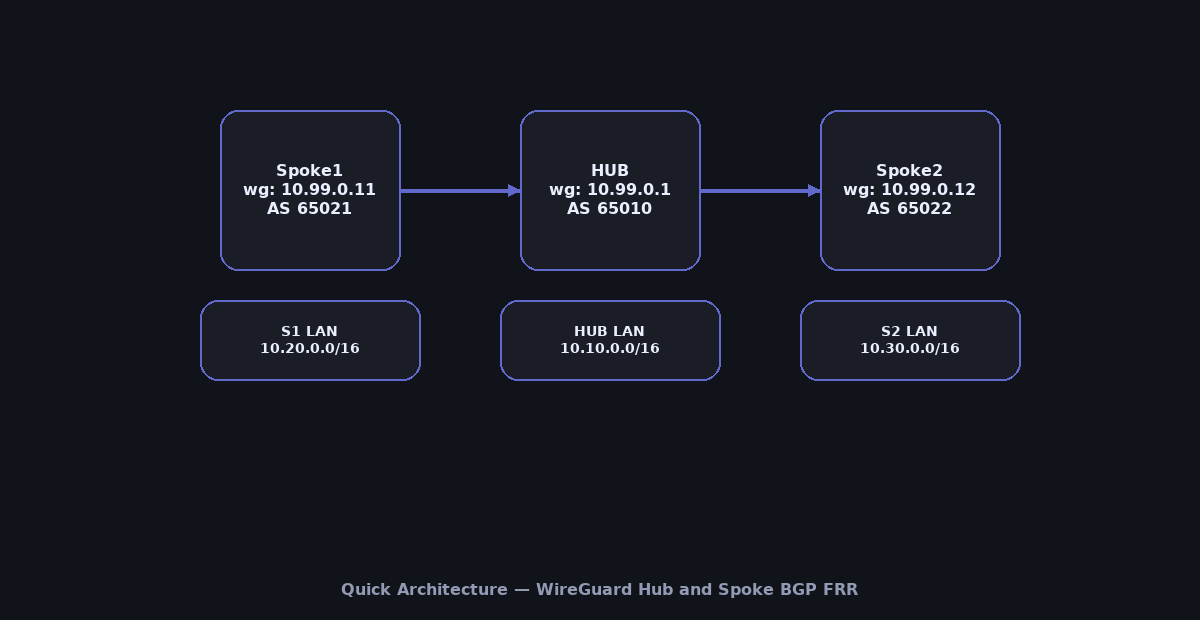
This guide builds a production-ready WireGuard Hub and Spoke BGP FRR fabric: one Hub and multiple Spokes connected with WireGuard tunnels.
Instead of static routes, we run FRR (Free Range Routing) with BGP over the tunnels so each site auto-learns remote LANs.
You’ll generate keys, create wg interfaces per peer, stand up FRR with clean BGP configs, and verify convergence/failover.
Docs: WireGuard ·
FRR User Guide.
Prerequisites
- 1 Hub gateway + 2 or more Spoke gateways (Linux, recent kernels).
- Public/reachable IP or DNAT for Hub; open UDP
51820(or your chosen port). - Each site has a distinct LAN prefix (e.g., Hub
10.10.0.0/16, Spoke110.20.0.0/16, Spoke210.30.0.0/16). - Shell access as root or via
sudoon all nodes.
Quick Architecture
IP Plan & Variables
Copy this block into a file (e.g., /root/wg-vars.sh) on every node, then source it before running commands.
# WireGuard overlay
export WG_NET="10.99.0.0/24"
export WG_HUB_IP="10.99.0.1/24"
export WG_S1_IP="10.99.0.11/24"
export WG_S2_IP="10.99.0.12/24"
export WG_PORT=51820

# Public endpoints (edit to your DNS/IP)
export HUB_ENDPOINT="hub.example.com"
export S1_ENDPOINT="s1.example.com"
export S2_ENDPOINT="s2.example.com"

# LANs
export HUB_LAN="10.10.0.0/16"
export S1_LAN="10.20.0.0/16"
export S2_LAN="10.30.0.0/16"

# BGP
export HUB_AS=65010
export SPOKE1_AS=65021
export SPOKE2_AS=65022
Install / Setup
Run only the matching block for your OS on each node. Then enable BGP daemon in FRR.
Ubuntu/Debian
sudo apt update
sudo apt -y install wireguard iproute2 frr frr-pythontools
sudo sed -i 's/^bgpd=no/bgpd=yes/' /etc/frr/daemons
sudo systemctl enable --now frr
RHEL/Rocky/CentOS Stream/Fedora
sudo dnf -y install wireguard-tools iproute frr
sudo sed -i 's/^bgpd=no/bgpd=yes/' /etc/frr/daemons
sudo systemctl enable --now frr
Arch/Manjaro
sudo pacman -Syu --noconfirm wireguard-tools frr
sudo sed -i 's/^bgpd=no/bgpd=yes/' /etc/frr/daemons
sudo systemctl enable --now frr
openSUSE/SLE
sudo zypper refresh
sudo zypper install -y wireguard-tools frr
sudo sed -i 's/^bgpd=no/bgpd=yes/' /etc/frr/daemons
sudo systemctl enable --now frr
Enable IP forwarding (all nodes)
echo 'net.ipv4.ip_forward=1' | sudo tee /etc/sysctl.d/99-wg.conf
sudo sysctl --system | grep net.ipv4.ip_forward
Base Configuration (WireGuard + FRR/BGP)
We will configure: (1) unique keypairs per node, (2) one wg interface per neighbor on the Hub, and (3) one wg interface to the Hub on each Spoke.
Step 1 — Generate keys (on each node)
Run on Hub:
umask 077
wg genkey | sudo tee /etc/wireguard/hub.key | wg pubkey | sudo tee /etc/wireguard/hub.pub
sudo chmod 600 /etc/wireguard/hub.key
sudo cat /etc/wireguard/hub.pub
Run on Spoke1:
umask 077
wg genkey | sudo tee /etc/wireguard/s1.key | wg pubkey | sudo tee /etc/wireguard/s1.pub
sudo chmod 600 /etc/wireguard/s1.key
sudo cat /etc/wireguard/s1.pub
Run on Spoke2:
umask 077
wg genkey | sudo tee /etc/wireguard/s2.key | wg pubkey | sudo tee /etc/wireguard/s2.pub
sudo chmod 600 /etc/wireguard/s2.key
sudo cat /etc/wireguard/s2.pub
Step 2 — Exchange public keys
- Copy
hub.pubto both Spokes. - Copy
s1.pubto Hub; copys2.pubto Hub.
Step 3 — Create WireGuard interfaces
On Hub create one interface per Spoke.
/etc/wireguard/wg-s1.conf
[Interface]
PrivateKey = (contents of /etc/wireguard/hub.key)
Address = ${WG_HUB_IP}
ListenPort = ${WG_PORT}
MTU = 1420

[Peer]
PublicKey = (paste s1.pub)
AllowedIPs = ${WG_S1_IP}
Endpoint = ${S1_ENDPOINT}:${WG_PORT}
PersistentKeepalive = 25
/etc/wireguard/wg-s2.conf
[Interface]
PrivateKey = (contents of /etc/wireguard/hub.key)
Address = ${WG_HUB_IP}
ListenPort = ${WG_PORT}
MTU = 1420

[Peer]
PublicKey = (paste s2.pub)
AllowedIPs = ${WG_S2_IP}
Endpoint = ${S2_ENDPOINT}:${WG_PORT}
PersistentKeepalive = 25
On Spoke1:
/etc/wireguard/wg-hub.conf
[Interface]
PrivateKey = (contents of /etc/wireguard/s1.key)
Address = ${WG_S1_IP}
ListenPort = ${WG_PORT}
MTU = 1420

[Peer]
PublicKey = (paste hub.pub)
AllowedIPs = ${WG_HUB_IP}
Endpoint = ${HUB_ENDPOINT}:${WG_PORT}
PersistentKeepalive = 25
On Spoke2:
/etc/wireguard/wg-hub.conf
[Interface]
PrivateKey = (contents of /etc/wireguard/s2.key)
Address = ${WG_S2_IP}
ListenPort = ${WG_PORT}
MTU = 1420

[Peer]
PublicKey = (paste hub.pub)
AllowedIPs = ${WG_HUB_IP}
Endpoint = ${HUB_ENDPOINT}:${WG_PORT}
PersistentKeepalive = 25
Step 4 — FRR BGP configs
On Hub (/etc/frr/frr.conf):
frr defaults traditional
!
router bgp ${HUB_AS}
 bgp router-id 10.99.0.1
 neighbor 10.99.0.11 remote-as ${SPOKE1_AS}
 neighbor 10.99.0.12 remote-as ${SPOKE2_AS}
 ! Advertise hub LAN
 network ${HUB_LAN}
!
line vty
On Spoke1 (/etc/frr/frr.conf):
frr defaults traditional
!
router bgp ${SPOKE1_AS}
 bgp router-id 10.99.0.11
 neighbor 10.99.0.1 remote-as ${HUB_AS}
 ! Advertise spoke1 LAN
 network ${S1_LAN}
!
line vty
On Spoke2 (/etc/frr/frr.conf):
frr defaults traditional
!
router bgp ${SPOKE2_AS}
 bgp router-id 10.99.0.12
 neighbor 10.99.0.1 remote-as ${HUB_AS}
 ! Advertise spoke2 LAN
 network ${S2_LAN}
!
line vty
Routing Policy & Advertisements
Default is one LAN per site. To filter or change attributes, use prefix-lists and route-maps. Example (apply on Hub): only accept up to /24 from each Spoke.
router bgp ${HUB_AS}
 neighbor 10.99.0.11 route-map FROM-S1 in
 neighbor 10.99.0.12 route-map FROM-S2 in
!
ip prefix-list ONLY-24 permit 0.0.0.0/0 le 24
route-map FROM-S1 permit 10
 match ip address prefix-list ONLY-24
route-map FROM-S2 permit 10
 match ip address prefix-list ONLY-24
Reload/Enable & Health Checks
Step 5 — Bring up WireGuard
On Hub:
sudo systemctl enable --now wg-quick@wg-s1
sudo systemctl enable --now wg-quick@wg-s2
sudo wg show
On Spokes (each one):
sudo systemctl enable --now wg-quick@wg-hub
sudo wg show
Step 6 — Restart FRR and verify BGP
sudo systemctl restart frr
vtysh -c 'show ip bgp summary'
vtysh -c 'show ip bgp'
# You should see Hub learn S1_LAN and S2_LAN, and Spokes learn HUB_LAN.
Step 7 — Basic routing checks
# From Hub, should see routes to Spoke LANs:
ip route | grep -E '10\.20\.|10\.30\.'

# From Spoke1, should see route to Hub LAN:
ip route | grep '10\.10\.'

# Ping across sites (adjust IPs to your LAN hosts):
ping -c3 10.20.0.10 || true
ping -c3 10.10.0.10 || true
Security / Hardening
Open only the WireGuard UDP port; limit vtysh to admins; protect private keys.
Ubuntu/Debian (UFW)
sudo ufw allow OpenSSH
sudo ufw allow ${WG_PORT}/udp
sudo ufw reload
sudo ufw status
RHEL/Rocky/CentOS/Fedora/openSUSE/SLE (firewalld)
sudo firewall-cmd --permanent --add-port=${WG_PORT}/udp
sudo firewall-cmd --reload
sudo firewall-cmd --list-ports
Key hygiene: keep /etc/wireguard/*.key at 600, root-owned; never share private keys.
Performance & Optimization
- MTU: Test with
ping -M do; 1380–1420 works in most NATs. - Keepalives:
25sto maintain NAT bindings across multiple tunnels. - BGP timers: for faster convergence lower
keepalive/holdbut beware flaps (e.g., 10/30s).
Backup & Restore
Backup
sudo tar -C / -czf /root/wg-bgp-backup-$(date +%F).tgz   etc/wireguard etc/frr --numeric-owner
sha256sum /root/wg-bgp-backup-$(date +%F).tgz
Restore
BACKUP="/root/wg-bgp-backup-YYYY-MM-DD.tgz"
sudo tar -C / -xzf "$BACKUP"
sudo chown -R root:root /etc/wireguard /etc/frr
sudo chmod 600 /etc/wireguard/*.key || true
sudo systemctl restart wg-quick@wg-s1 || true
sudo systemctl restart wg-quick@wg-s2 || true
sudo systemctl restart wg-quick@wg-hub || true
sudo systemctl restart frr
Troubleshooting (Top issues)
No BGP session — WG up but routes missing: check AllowedIPs include peer WG IPs; verify UDP reachability and BGP ASNs.
sudo wg show
vtysh -c 'show ip bgp summary'
sudo journalctl -u frr --since "10 min ago"
Routes flap — Too-aggressive timers or MTU issues; raise BGP timers and lower MTU.
vtysh -c 'show interface wg-s1'
ping -M do -s 1372 10.99.0.11
Key Takeaways & Next Steps
- WireGuard Hub and Spoke BGP FRR scales cleanly: add peers, advertise prefixes—no manual static routes.
- Harden keys/firewall; tune MTU and BGP timers for stability.
- Next: add route reflectors, multi-hub redundancy, or export metrics to Prometheus.