- Overview
- Prerequisites
- Quick Architecture
- Install / Setup
- Base Configuration
- Reload/Enable & Health Checks
- Security / Hardening
- Performance & Optimization
- Backup & Restore
- Troubleshooting (Top issues)
- Key Takeaways & Next Steps
Overview
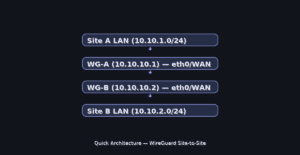
This guide walks you through a practical wireguard site to site vpn setup. You will build a site-to-site tunnel between two Linux gateways (WG‑A & WG‑B), route two LANs, persist configs, secure with firewall, and verify connectivity.
Prerequisites
- OS: Ubuntu/Debian, RHEL/Rocky/Fedora, Arch/Manjaro, openSUSE/SLE
- Ports: UDP
51820open between gateways - Placeholders:
WG_IF=wg0,LAN_A=10.10.1.0/24,LAN_B=10.10.2.0/24,WG_NET=10.10.10.0/24. - Reference: WireGuard official docs: https://www.wireguard.com/#documentation
Quick Architecture
Install / Setup
Install WireGuard tools and enable IPv4 forwarding. Copy the block for your OS only.
Ubuntu / Debian
sudo apt update
sudo apt install -y wireguard
echo 'net.ipv4.ip_forward=1' | sudo tee /etc/sysctl.d/99-wireguard.conf
sudo sysctl --system
RHEL / Rocky / Fedora
sudo dnf install -y wireguard-tools
echo 'net.ipv4.ip_forward=1' | sudo tee /etc/sysctl.d/99-wireguard.conf
sudo sysctl --system
Arch / Manjaro
sudo pacman -S --noconfirm wireguard-tools
echo 'net.ipv4.ip_forward=1' | sudo tee /etc/sysctl.d/99-wireguard.conf
sudo sysctl --system
openSUSE / SLE
sudo zypper install -y wireguard-tools
echo 'net.ipv4.ip_forward=1' | sudo tee /etc/sysctl.d/99-wireguard.conf
sudo sysctl --system
Base Configuration
Generate key-pairs on each gateway and create the peer configs. Run the appropriate block on the indicated node.
WG‑A — generate keys
wg genkey | tee ~/privatekey | wg pubkey | tee ~/publickey
PRIV_A=$(cat ~/privatekey); PUB_A=$(cat ~/publickey)
WG‑B — generate keys
wg genkey | tee ~/privatekey | wg pubkey | tee ~/publickey
PRIV_B=$(cat ~/privatekey); PUB_B=$(cat ~/publickey)
WG‑A — interface & peer (points to WG‑B)
sudo tee /etc/wireguard/wg0.conf <<'CFG'
[Interface]
Address = 10.10.10.1/24
PrivateKey = ${PRIV_A}
ListenPort = 51820

[Peer]
PublicKey = ${PUB_B}
AllowedIPs = 10.10.10.2/32, 10.10.2.0/24
Endpoint = B_PUBLIC_IP:51820
PersistentKeepalive = 15
CFG
WG‑B — interface & peer (points to WG‑A)
sudo tee /etc/wireguard/wg0.conf <<'CFG'
[Interface]
Address = 10.10.10.2/24
PrivateKey = ${PRIV_B}
ListenPort = 51820

[Peer]
PublicKey = ${PUB_A}
AllowedIPs = 10.10.10.1/32, 10.10.1.0/24
Endpoint = A_PUBLIC_IP:51820
PersistentKeepalive = 15
CFG
Reload/Enable & Health Checks
Bring the interface up on each node and verify tunnel and routes.
Enable and verify (run on both gateways)
sudo systemctl enable --now wg-quick@wg0
sudo wg show
ip route | grep 10.10.
ping -c2 10.10.10.1  # from WG-B (or .2 from WG-A)
ping -c2 10.10.2.1   # test LAN_B gateway from Site A
Security / Hardening
Allow only UDP 51820 and keep keys root-only. Copy the firewall block for your distro.
UFW (Ubuntu/Debian)
sudo ufw allow 51820/udpFirewalld (RHEL/Rocky/Fedora/openSUSE/SLE)
sudo firewall-cmd --permanent --add-port=51820/udp
sudo firewall-cmd --reload
Performance & Optimization
Adjust MTU if you see fragmentation or handshake issues; start at 1420.
echo 'PostUp=ip link set dev wg0 mtu 1420' | sudo tee -a /etc/wireguard/wg0.conf
echo 'PostDown=ip link set dev wg0 mtu 1420' | sudo tee -a /etc/wireguard/wg0.conf
sudo systemctl restart wg-quick@wg0
Backup & Restore
Back up interface configs and keys; restore with permissions preserved.
sudo tar -C /etc/wireguard -czf ~/wireguard-backup.tgz .
# Restore
sudo systemctl stop wg-quick@wg0
sudo tar -C / -xzf ~/wireguard-backup.tgz etc/wireguard
sudo chown -R root:root /etc/wireguard && sudo chmod 600 /etc/wireguard/*.conf
sudo systemctl start wg-quick@wg0
Troubleshooting (Top issues)
1) Handshake not happening — UDP blocked or endpoint wrong
sudo ss -ulpn | grep 51820
sudo journalctl -u wg-quick@wg0 --no-pager | tail -n50
sudo ping -c2 A_PUBLIC_IP; sudo ping -c2 B_PUBLIC_IP
2) No LAN routing — AllowedIPs/forwarding missing
sudo sysctl net.ipv4.ip_forward
sudo ip route | egrep '10.10.1.0|10.10.2.0'
sudo iptables -S | grep FORWARD  # or: sudo nft list ruleset
3) Flapping tunnel — NAT/CGN or MTU mismatch
sudo wg show; grep -n 'mtu' /etc/wireguard/wg0.conf
sudo tcpdump -ni wg0 udp port 51820 -vv
Key Takeaways & Next Steps
- Run only the block for your OS/node to avoid copy-paste mistakes.
- Harden endpoints; allow only UDP 51820 from trusted IPs.
- Monitor with
wg show+ journald; back up keys securely.